
The free Rightmove extension for Chrome, Firefox and Edge
Property Track adds the one thing Rightmove leaves out: the full price history of every listing. Free, unlimited, and no signup.
 Download on Chrome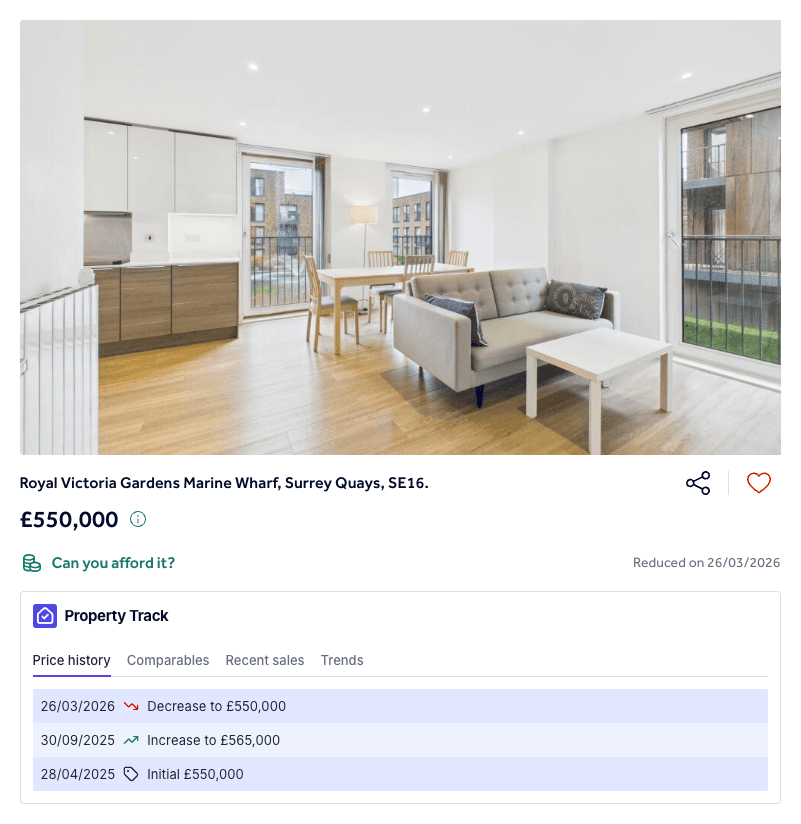
5.0 on the Chrome Web Store · 2,000+ monthly active users · 8M+ listings tracked
How to install
Two clicks, nothing to configure, and no account needed.
Open the extension page for your browser: Chrome Web Store, Firefox Add-ons or Edge Add-ons.
Click Add to Chrome, Add to Firefox or Get (on Edge). There is nothing to configure.
Open any listing on rightmove.co.uk - the price history appears on the page (refresh the tab if it was already open). The Comparables, Recent sales and Trends tabs beside it come with Plus.
New to price history? Read our guide on how to see price history on Rightmove, or see how Property Track compares in our roundup of the best Rightmove extensions.
Frequently asked questions
- Is the Property Track extension free?
- Yes. Installing it is free, and so is the price history on every listing, with no account, no card and no search limit. Property Track Plus is an optional subscription, from £4.99 a month billed annually, that adds Comparables, Recent sales and Trends to the same widget. See pricing for the details.
- Is there a Rightmove extension for Firefox?
- Yes. Property Track is available for Firefox from Mozilla Add-ons, for Edge from Microsoft Edge Add-ons, and for Chrome from the Chrome Web Store.
- Is it a Chrome extension, a plugin or an add-on?
- They are three names for the same thing. Chrome calls them extensions, Firefox and Edge call them add-ons, and plugin is the older word for both. Property Track is one Rightmove extension, published on the Chrome Web Store, Firefox Add-ons and Edge Add-ons.
- Does it work in Brave, Arc or Safari?
- Brave, Arc and other Chromium-based browsers can generally install the Chrome Web Store version, but Chrome, Firefox and Edge are the browsers we officially support and test. Safari is not supported.
- What permissions does it need?
- The extension only runs on Rightmove pages. Price history needs no account (you only sign in for Plus), and the extension does not collect personal browsing data - only public property listing data is stored.
What people say about Property Track
Reviews from the Chrome Web Store, word for word. Read them all